



Start here
Yes. iPhone has Apple Shared Albums in Photos. Turn on Shared Albums in your iCloud Photos settings, then create an album from Photos, Collections, Shared Albums on iOS 26 or 27. Choose its participants and sharing permissions before adding private pictures.
For your next trip, party or wedding
Next time, skip the shared album
Create a Sealed capsule before the moment. Everyone shoots from their own phone, nobody sees a thing until the reveal, then the whole group opens it together.
- Each guest installs Sealed and joins with a 6-character code or a link, on iPhone or Android. Up to 30 phones, no account needed.
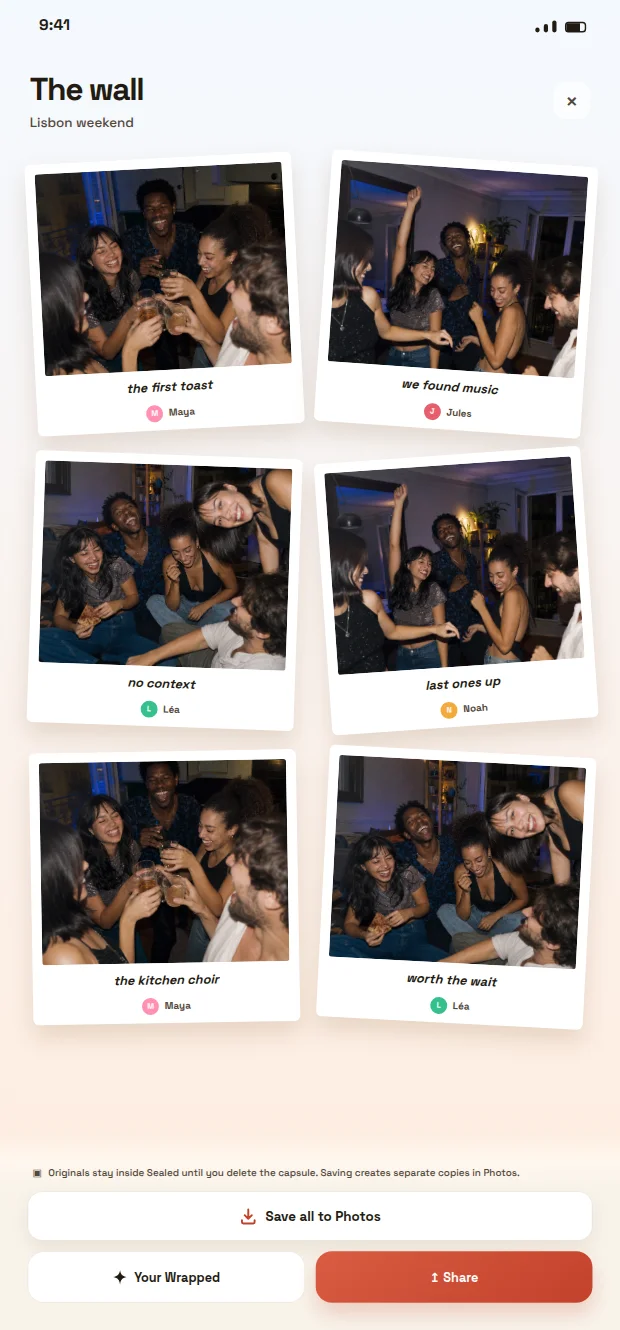
- Every photo lands on one wall, with the name of who took it. Nothing to chase afterwards.
- Photos stay sealed until the deadline, so people keep shooting instead of reviewing.
- When it opens, save the whole wall to Photos in one tap.

Scan with your phone camera to install Sealed
Free download. Sealed does not repair or recover Apple Shared Albums.
Planning an event? Wedding photo app · Birthday party photo app · Bachelorette party photo app
Set up the Apple album before inviting the group
Open Settings, your name, iCloud, Photos and enable Shared Albums. Apple’s current instructions also require iCloud Photos for iOS 27. In Photos, Collections, Shared Albums, use the add button and give the album a recognizable name.
On iOS 26, select pictures, choose the people to invite and create the album. On iOS 27, review Sharing Options when creating it. Use Apple’s version-specific instructions below if the controls on your phone differ.
Decide who can enter and contribute
Choose whether participants should only view or also add their own pictures. Check the permission in the album’s participant settings. Try one non-sensitive photo with a consenting participant before relying on the setup for an event.
The sharing model depends on the album version. Apple documents web contribution without an Apple device or account for albums created with the newer iOS 27 experience, subject to availability and access settings. For the older iOS 26 Public Website option, Apple describes a publicly viewable website. Do not treat these two options as the same privacy or contribution model.
Choose the right kind of shared space
An ordinary album organizes your own library. A Shared Album lets invited people view selected items and, when allowed, contribute. iCloud Shared Photo Library is another feature, with a shared library rather than this selected-album workflow.
For family holiday pictures, start by deciding who selects the photos and who should see them. For a party, also decide whether pictures should appear during the event or stay unseen until later. Those choices matter more than simply having a shared link.
Keep access and originals under control
Explain the audience before inviting people and agree on whether pictures can be forwarded. Check the owner’s sharing settings before enabling a public link. A participant’s ability to save an image can extend its life beyond the album.
Keep important originals separately. Ask the owner before removing content: deleting from a shared album can affect other participants. If the album exists but cannot be found, ask the owner to confirm the invitation or link. If it opens without expected photos, use the troubleshooting guide below.
When a Sealed capsule fits the event
If the aim is taking new pictures without immediate previews, try a shared Sealed capsule: each guest joins from their own phone with a code or a link, the images stay sealed and the group opens the capsule after its deadline. Agree on participation and saving the results after opening.
Sealed is a separate experience, not an iCloud repair or an automatic import of Apple albums. Compare the event-photo guide below and verify the participation path for your group. Do not assume universal browser or multi-phone access. Apple documentation checked on 26 September 2026.
Frequently asked questions
Do I need another app to make an Apple Shared Album?
No. Apple provides Shared Albums in Photos. Sealed serves a separate photo-capsule and reveal activity.
Can someone without an iPhone participate?
Check the album version and permissions. Apple documents web contribution for the newer iOS 27 experience. The older Public Website option is not the same contribution model.
Sources and further reading
These resources provide the wider reference frame. Product statements on this page are limited to the public information provided by Sealed.
- Apple: if you can’t see your shared album or it isn’t syncing
- Apple: Shared Albums, with separate iOS 26 and iOS 27 instructions
- Apple: find and accept a Shared Album invitation
- Apple: resend an invitation or check an album that is no longer shared
- Apple: upgrading an older shared album
- Apple: live system status
- Sealed: photo capsules and reveal
- Sealed methodology