



For your next trip, party or wedding
Next time, skip the shared album
Create a Sealed capsule before the moment. Everyone shoots from their own phone, nobody sees a thing until the reveal, then the whole group opens it together.
- Each guest installs Sealed and joins with a 6-character code or a link, on iPhone or Android. Up to 30 phones, no account needed.
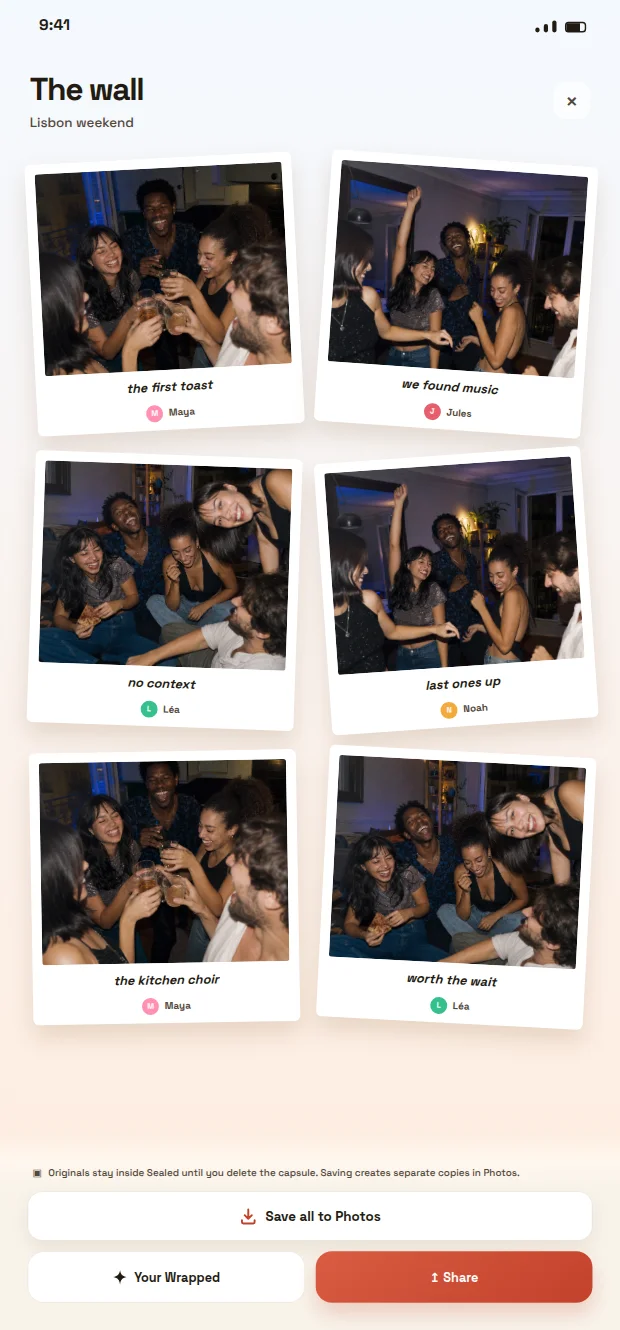
- Every photo lands on one wall, with the name of who took it. Nothing to chase afterwards.
- Photos stay sealed until the deadline, so people keep shooting instead of reviewing.
- When it opens, save the whole wall to Photos in one tap.

Scan with your phone camera to install Sealed
Free download. Sealed does not repair or recover Apple Shared Albums.
Planning an event? Wedding photo app · Birthday party photo app · Bachelorette party photo app
Start with the invitation and the intended album
If you are wondering how to access a shared photo album, begin with the invitation rather than searching broadly through old links, messages, or accounts. Open the most recent invite from the person who created the album, then check its title, event date, and participant list where those details are shown. This reduces the common mistake of joining an older album with a similar name.
An invitation may arrive as a link, a message inside an existing photo service, an email, or an in-person prompt. Follow the route supplied by the organiser and use the account or device they intended when the service asks you to sign in. If the invitation has expired, fails to open, or appears to point somewhere unexpected, ask the organiser to send a fresh invitation instead of guessing at another access route.
- Check that the event name and date match the group occasion.
- Confirm that the invitation came from the organiser or another known participant.
- Use a newly sent link if an old one produces an error.
How to access a shared photo album reliably
A reliable result is more than seeing a page load: it means reaching the correct album with the access level the organiser intended. After opening the invitation, verify whether you can view, add, download, comment on, or otherwise interact with images. Do not assume that viewing permission automatically includes permission to contribute or redistribute photos.
If access is denied, first check the practical basics: the signed-in account, the spelling of an email address or phone number used for the invite, and whether the album is limited to named people. Then contact the organiser with a concise description of what you see. A screenshot of an error message can help, but avoid including identifiable images when sharing it.
Cloud-based albums can be useful when a group wants ongoing access and separate viewing. A local photo capsule is a different kind of arrangement: its purpose can be to hold the group’s images for a later shared opening rather than encourage constant checking. Sealed’s public materials describe its approach in those terms, so the advice here is about choosing and accessing the format agreed by the group, not a claim that one format suits every occasion.
- Verify the account before requesting a new invite.
- Check your actual permissions after entry.
- Tell the organiser the exact error and the account identifier they should invite.
Confirm consent before you view, add, or share
Access should not override participant consent. Before adding a photo of identifiable people, sharing an album link onward, or downloading images for another use, make sure the people involved have agreed to be photographed or shared in that context. The organiser may have invited you to an album, but that does not automatically settle every participant’s preference.
This matters especially when an album combines people who do not know one another well, includes children, or covers an occasion where someone may prefer not to appear online. Ask early, keep the question specific, and respect a no without asking the person to justify it. If consent changes later, the practical response is to stop sharing the relevant image and alert the organiser so they can handle the album appropriately.
Sealed publicly provides privacy, terms, and child-safety information. Those pages can help visitors understand its stated context, but translations of editorial material do not prove that its interface, app-store listing, or support are offered in the same language. Check the current local listing before relying on language availability.
- Ask before photographing identifiable participants.
- Do not forward an invite merely because you can open it.
- Treat children’s images with particular care and follow the organiser’s agreed boundaries.
Choose the access pattern that fits the occasion
The best access pattern depends on what the group is trying to protect. A cloud shared album is often oriented around easy, continuing access: people can return independently, contribute at different times, and organise images after the event. That can be appropriate when coordination and convenience are the main goals.
A delayed group reveal changes the rhythm. Rather than reviewing each image while the event is still happening, participants can keep their attention on one another and open the collection together at an agreed moment. Sealed explores that kind of intentional group photography: the photographs are collected as a shared capsule, with the opening designed as part of the group ritual.
Neither approach removes the need for clear instructions. Decide who creates the album, who can enter it, whether participants can add images, when the collection becomes viewable, and whether anyone may share images outside the group. Put those decisions in the invitation or a short message before the event, when they are easiest to understand.
- Choose ongoing individual access when the group needs flexible coordination.
- Choose a delayed opening when shared anticipation is part of the occasion.
- State contribution, viewing, and onward-sharing expectations separately.
Example: a birthday group with a planned reveal
Example: Eight friends are meeting for a birthday dinner. One person creates a shared collection and sends access instructions before the meal. The group agrees that participants may take pictures, that no one should post identifiable images publicly without asking, and that the collection will be opened together the following afternoon.
During dinner, the organiser avoids turning the process into a constant administrative task. People take photos when it feels natural, add them according to the agreed method, and return to the conversation. The next day, the organiser confirms that everyone who should participate can enter the correct collection before the group opens it.
If one guest cannot access the collection, the group does not work around the problem by forwarding images indiscriminately. The organiser checks the invitee’s account details, reissues access if needed, and waits until the agreed participants can join. That small pause supports the purpose of the ritual: a thoughtful reveal that belongs to the group rather than a partial preview for whoever got in first.
- Before: agree on photography, access, and sharing boundaries.
- During: keep the process light so it does not dominate the gathering.
- Before opening: verify that intended participants can access the correct collection.
A final access checklist
Use this checklist whenever you receive or create an invitation. It is designed to make access dependable without making the album feel like another technical task. The goal is not perfect control; it is a clear, respectful route from invitation to shared viewing.
First, confirm you have the current invitation and are signed in with the intended account. Second, verify that the album title and event details are right. Third, check your permission level rather than assuming you can contribute or share. Fourth, confirm the group’s consent and sharing expectations. Finally, if the album is meant to be opened together, avoid previewing or circulating photos before the agreed reveal.
When those checks are in place, accessing a shared photo album becomes straightforward: use the organiser’s current invitation, enter through the correct account, confirm the album and permissions, and follow the group’s consent and reveal agreement. The technology matters, but the shared expectations are what make the result reliable.
- Current invitation confirmed.
- Correct account signed in.
- Album identity and permissions checked.
- Participant consent and sharing boundaries understood.
- Reveal timing respected, if the group has chosen one.
Frequently asked questions
How do I access a shared photo album if the link does not work?
Ask the organiser to confirm the account they invited and send a fresh invitation. Check that you are signed in with that account, then verify that the new link matches the intended event and album.
Can I share a shared photo album invitation with someone else?
Only share an invitation when the organiser and identifiable participants have agreed that the additional person should have access. Being able to open an album does not by itself give permission to extend access.
What should a group decide before opening a shared photo album?
Agree on who may view and contribute, whether images may be downloaded or shared beyond the group, and whether the collection is meant for immediate viewing or a later group reveal.
Sources and further reading
These resources provide the wider reference frame. Product statements on this page are limited to the public information provided by Sealed.